
Bug Fix:
- Being able to enable/disable packages on the shopping cart
- Course Type Sequence is not showing correctly on the Menu Builder
Feature Request:
- Add Cost Center Area and Public Facing Name allowing Cart Users clients can select their preferred Delivery Area
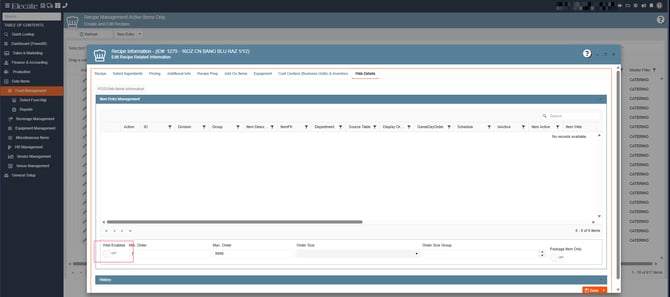
When the toggle is enabled, the item is visible in the shopping cart. When the toggle is disabled, the item is removed from the shopping cart. This behavior applies to recipes, equipment, and beverages, and must remain fully synchronized with no restrictions.
1. On the left side panel, go to Data Items
2. Click on Food Management
3. Select Recipe Management Active Items Only
4. Open an existing Recipe and go to the Web Details Tab
- Ensure the print order field matches the sequence you added on the Event Sales Menu builder for those courses.


In the Cost Center Management Window, we need to do the following changes (see final wireframe at the end of the description):
- Add two new fields to the Cost Center record In Administration Settings > Business Units > Create and Edit Cost Centers, display two new fields when opening any Cost Center record.
- Cost Center Display Name (text)
- Make the field optional.
- Default its value to the existing Cost Center name for both new and existing records.
- Allow the Administrator to edit it.
- Add the Cost Center Area field (dropdown)
- Make the field optional.
- Populate its values from the AppCode Category
CostCenterArea. - Default its value to
Not Applicablefor both new and existing records.
- UI/UX Enhancements
- Make the ID field of the minimum size, remove the current numbers picker controls
- Change the Cost Center label to Cost Center Name, the Edit button must have the correct size and located next to the Cost Center Name field
- Improve readability of the days checkboxes
- Create a deployment script to guarantee the AppCode configuration
- Create the AppCode Category
CostCenterAreaif it does not exist. - Add a default value
Not Applicableunder that Category if no AppCode value exists. - Backfill existing Cost Center records so that Cost Center Area =
Not Applicableand Customer Facing Name = current Cost Center name.
- Create the AppCode Category
