
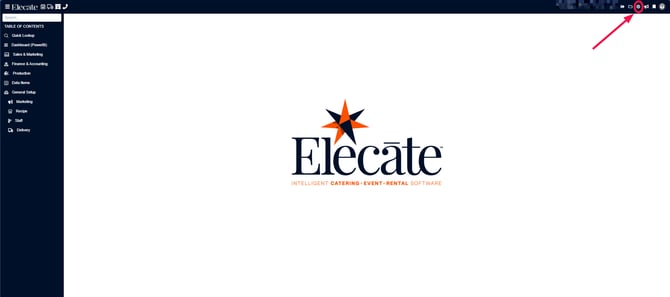
1. At the top of the screen, on the right side click on the Gear Icon
2. Go to Financial Setup:
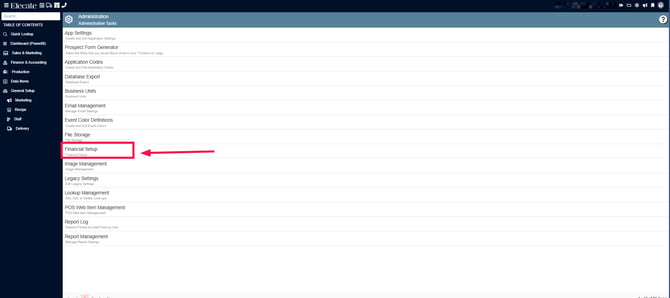
3. At the bottom of that window, you´ll see the following options: Group Management -Beverage, Group Management - Equipment, Group Management- Ingredient and Group Management - Menus, click on the one you need to modify, here you´ll have the option to update existing information or create New Groups:
If you need to edit an existing record, double click on the item: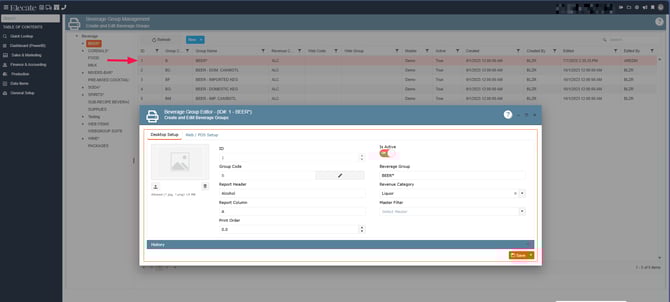
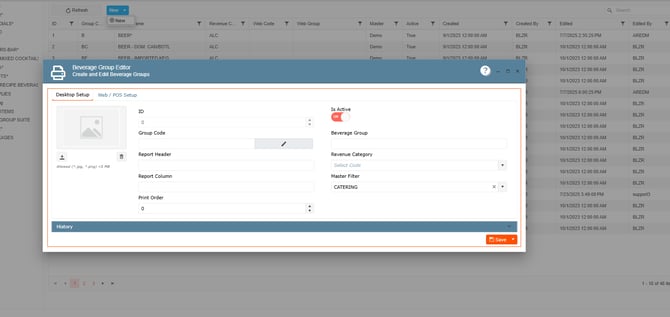
If a new record needs to be created, click on New Entry and fill out the required information, depending on the department you´ll need to add some extra information:
-
Revenue Categories must be set up first
Groups are linked to revenue categories and will not function correctly without them. -
Preconfigured System Groups
Elecate already includes standard groups for recipes. These should generally remain unchanged. -
Recommended Setup Sequence:
- Configure Revenue Categories
- Review existing Group structure
- Add or adjust Groups (if necessary)
- Assign data items (recipes, ingredients, etc.) to the appropriate groups
-
What can be deferred:
- Advanced restructuring (multi-level hierarchy adjustments)
- Custom grouping refinements for reporting optimization
How to Structure Groups
Scenario 1: Basic Setup
- Use existing Elecate groups
- Assign items directly to predefined sub-groups
Scenario 2: Moderate Customization
- Add second-level groups for better organization
- Example:
- Beverage*
- Beer – Domestic
- Beer – Imported
- Beverage*
Scenario 3: Advanced Structuring
- Use up to 3–4 levels for detailed reporting and filtering
- Example:
- 1 – Power & Lighting*
- 1V – Power & Light
- 1VC – Power
- 1V – Power & Light
- 1 – Power & Lighting*
Important Rules:
- Assign items only to lowest-level groups (children)
- Do NOT assign items to parent groups (*), as they may not display correctly
- Avoid renaming or deleting groups already linked to data
- If changes are required, validate impact on existing data